- DATE:
- AUTHOR:
- Versapay Team
New Feature: Support for Group Invoices in NetSuite
Platform: NetSuite Unified Platform (UP)
Product Area: ERP Payments + Collaborative AR
What’s New?
Versapay now supports Group Invoices from NetSuite using the Summary Invoice feature in Collaborative AR. This enhancement allows merchants who use NetSuite’s native Group Invoice functionality to sync and manage consolidated invoices in Collaborative AR—streamlining invoice delivery and payment experiences for customers.
What is a Group (Summary) Invoice?
In NetSuite, the Group Invoice feature allows users to combine multiple invoices into one consolidated "parent" invoice—ideal for customers who prefer fewer invoices or grouped billing cycles.
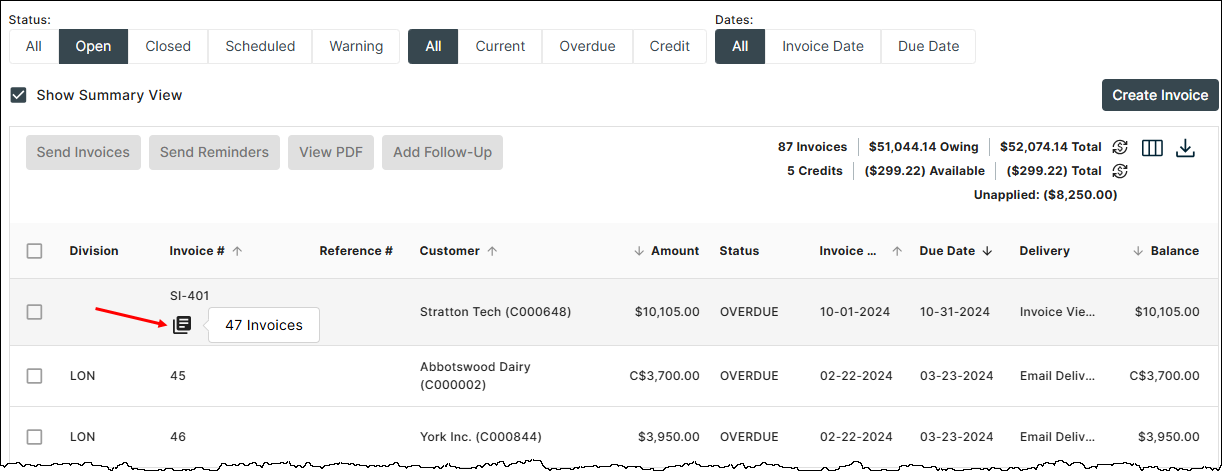
In Collaborative AR, this is referred to as a Summary Invoice, and it mirrors the NetSuite Group Invoice for consistent handling across platforms. A summary invoice has a special icon as shown below on the Invoices listing page, and hovering over the icon shows the number of invoices in the group.
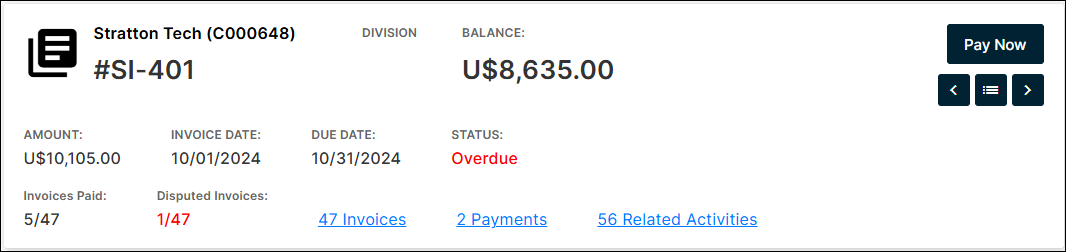
And here's a look at the header of a summary invoice on the Invoice detail page:
Data Flow: NetSuite → Collaborative AR
Group Invoice
Only syncs if one or more child invoices are attached
The “Do not sync to Versapay” box must be unchecked
Child Invoice
Must be marked for grouping and assigned to a parent Group Invoice to sync
Edits or removals of child invoices from the parent in NetSuite will not sync
The “Do not sync to Versapay” box must be unchecked
Reconciliation
Takes place at the child invoice level only
The Group (Summary) invoice is not used for reconciliation
Prerequisites
Embedded Bundle
Ensure the following bundles are installed and updated:
AR Automation & Collaboration (Bundle ID: 413798) – Version 2.0.0+
Versapay SuitePayment (Bundle ID: 124110) – Version 2025.2+
Group Invoices must be:
Enabled in NetSuite (consult NetSuite PS or your IT admin)
Enabled per customer record: "Enable Group Invoices"
Enabled per invoice: "For Invoice Grouping"
Setup & Functionality
PDF Setup (via Embedded Bundle)
To display Group Invoice PDFs in Collaborative AR:
Go to the Script Deployment for Versapay Integrations - PDF Endpoint
In the parameters, configure:
Group Detail Template: Script ID for Standard Invoice Group (Detailed View) template
Group Summary Template: Script ID for Standard Invoice Group (Summary View) template
Invoice Group Summary Search: Invoice Group PDF Print - Summary (comes with bundle 413798)
Invoice Group Detail Search: Invoice Group PDF Print - Detail (also from bundle 413798)
You can edit saved searches to customize column titles, data, and filters.
"Use Alias in Labels" → Enable to customize table headers
"Include Invoice Group Detail" → Enable for detailed PDF; disable for summary-only view
PDF output is generated using saved search data and NetSuite's native PDF templates. Versapay does not release the PDF or manage its formatting directly.